The SONE platform
One install. One licence. Every screen on air.
Every SONE product runs inside a single Windows service with a single web UI. Install it on one server or give each machine a role; your licence decides which products and add-ons are switched on, and everything else is already installed and waiting.
Any browser
- MCR
- Editorial
- CG desk
- Playout
- Planning
- Wall screens
SONE Server
One Windows service · one web port
- STicker
- SCG
- SDesigner
- SPO
- SMonitor
- SSocial
- STraffic
- SAudio
- SIngest
- SMAM
- STranscode
Every product is installed. The licence decides which ones you see.
Your control room
- Viz Enginemain + backup
- DeckLink / AJASDI outputs
- RoutersQuartz, TCP
- iNEWS & wiresNSML, RSS
- Zabbix / PRTG/api/health
Topologies
One server. Or as many as you need.
Start on a single Windows server. When the channel needs it, give playout and graphics their own machines and add backups, with the same software and the same licence model.
- control and data
- watched by SMonitor
- roadmap
Single server
Everything on one Windows machine.
- One setup.exe installs the SONE service, the web UI and the database
- SPO plays out through a DeckLink or AJA card in the same machine
- STicker and SCG drive your Viz Engines over the network
- SMonitor included from day one
Split
Each job on its own machine.
- SPO on a dedicated playout server with its own DeckLink or AJA card, media on shared storage
- SCG on a SONE graphics machine or on Viz Engine servers, STicker on Viz Engine, each with its own video card
- Graphics reach air as fill & key through your keyer or vision mixer, or burned straight into the SPO output
- One central console for every SONE server, with settings per node
- Database on a separate server (PostgreSQL) Roadmap
Redundant
A backup for every path to air.
- SPO hot-standby pair on shared storage: the backup follows the rundown and takes over from the same position
- Main and backup Viz Engine per channel; every TAKE goes to both
- Nightly database backups, checked by SMonitor
- SMonitor watches servers, engines, outputs, backups and the standby pair
- Main and backup SONE server Roadmap
- Database replica Roadmap
Machine roles
One installer. A role for every machine.
setup.exe asks what the machine is for. Choose all-in-one for a single server, or split the system into roles as the channel grows: every machine runs the same SONE software.
all-in-one
All-in-one
Service, web UI, database, playout and graphics on one Windows server.
application
Application
The SONE service and web UI that every desk signs in to.
playout
Playout
SPO outputs on the machine with the DeckLink or AJA card.
graphics
Graphics
The SONE render engine for SCG, as fill & key or burn-in.
database
Database server
Prepares a PostgreSQL host. SONE Server support for PostgreSQL is on the roadmap; today SONE runs on its embedded database.
Roadmap
The role is chosen in setup.exe; which products a machine runs still comes from the one signed licence.
Central console
One console for every server.
One SONE server is the controller; the others join it as nodes. The central console shows every node with its role and state, and each node’s settings are edited there.
- Controller and nodes, each with its machine role
- Every node’s role and state in one list
- Settings per node, edited from one place
SONE Server Manager
The server, from the tray.
SONE Server Manager sits in the Windows notification area of every SONE machine, so the people who look after the servers see at a glance whether the service is running.
- Service state in the Windows tray
- Start and stop the SONE service
- One click to the web UI
Stations and screens
Every desk gets the screen it needs.
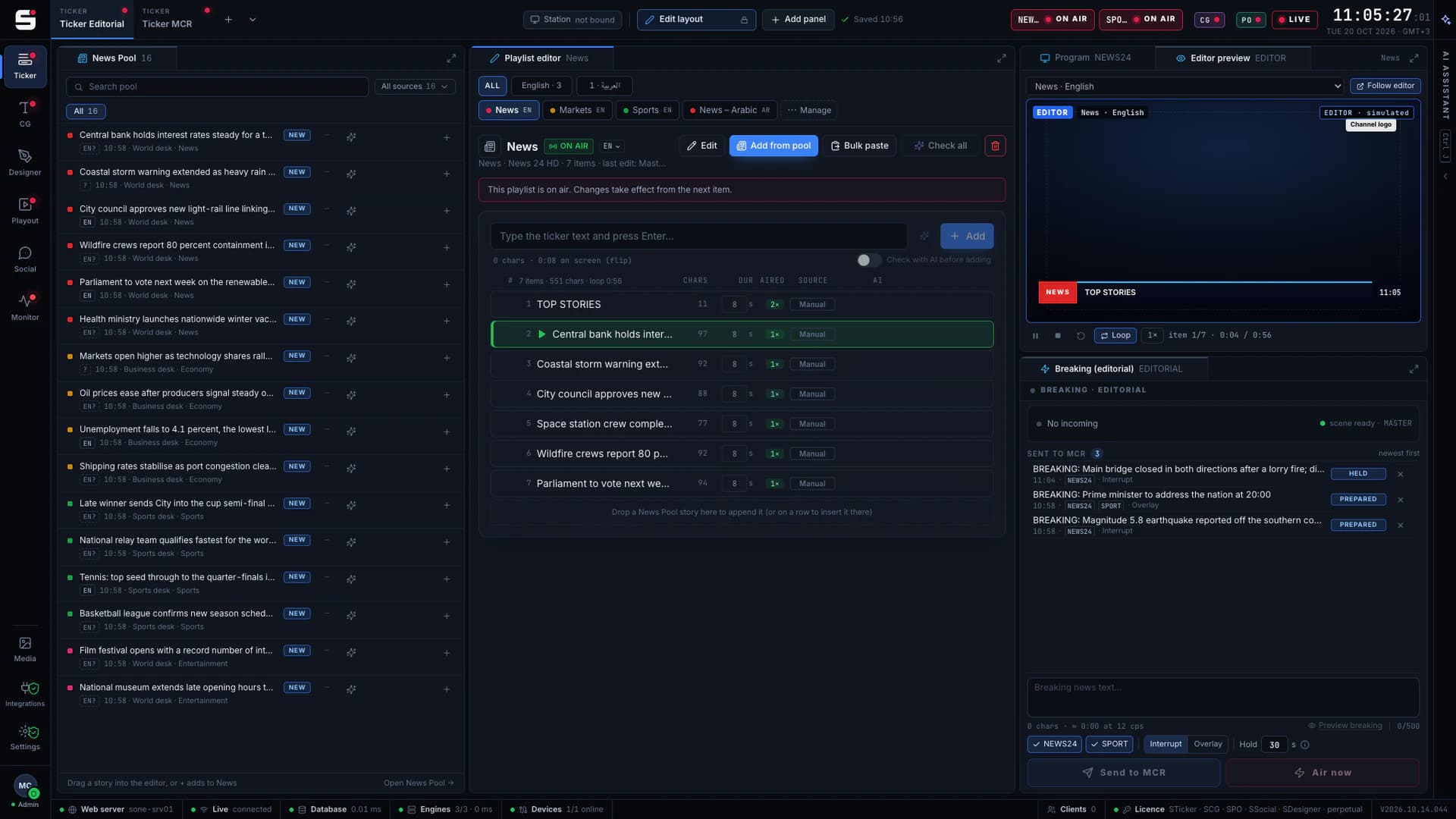
Workspaces are dockable panels you arrange once and lock: an MCR night layout, a ticker editor desk, a CG desk, a playout position, a planning desk. Stations and screens decide who sees what, per user and per PC.
- Personal and shared workspaces, lock and edit mode
- Stations: each PC opens with its own products, screens and layout
- Screens per user and per PC: a planner sees STraffic, an MCR position sees playout
- Roles from admin to viewer, with per-category rights
- Active Directory over LDAPS, step-up verification for settings
- Audit log of every take, edit and sign-in
Licensing
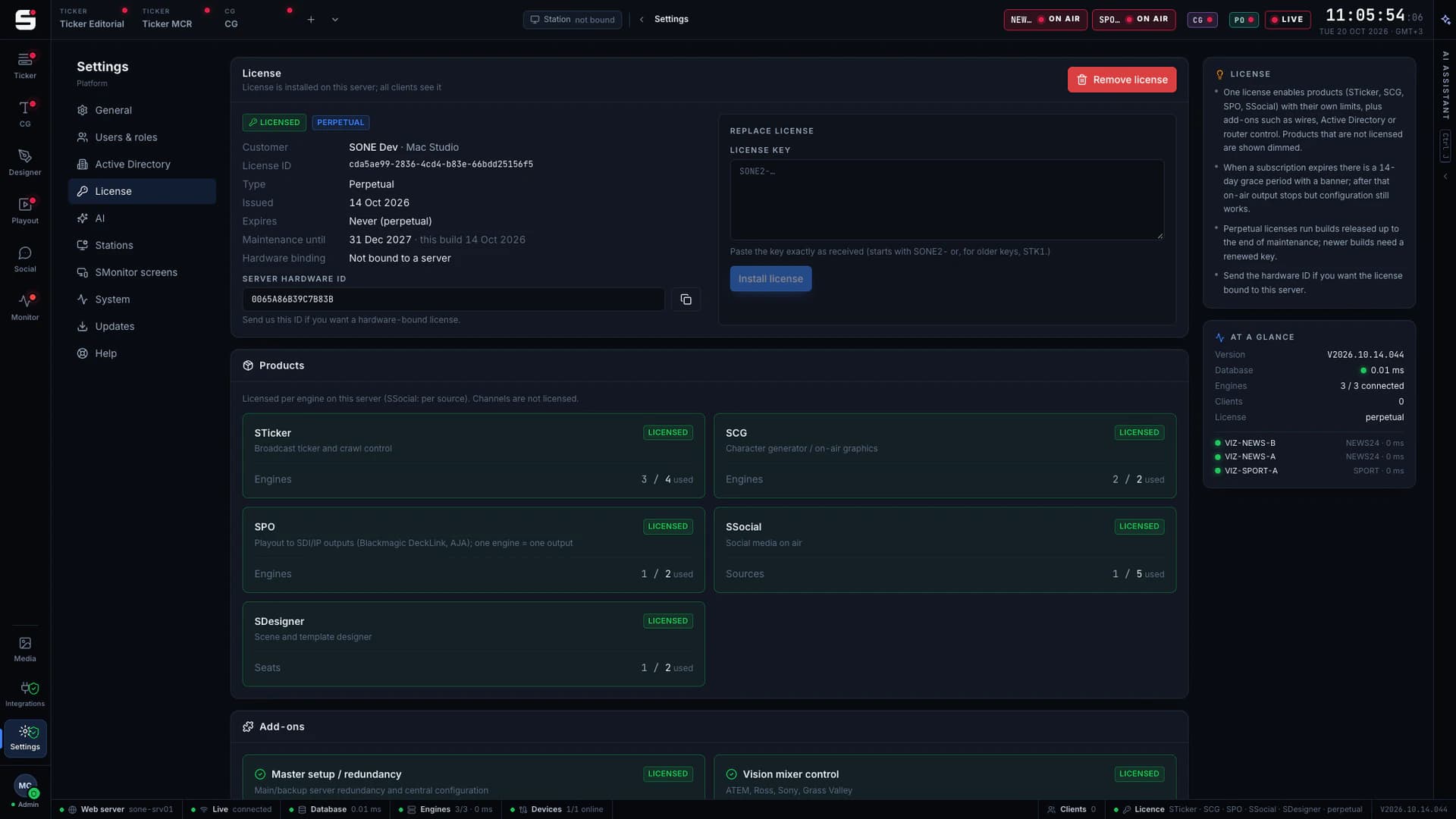
One signed licence switches everything on.
A single offline-verifiable key lists your products, their limits and your add-ons. Perpetual, subscription and trial keys share one format, with a separate maintenance date. Channels are free; only STraffic is licensed per planned channel, SIngest per record or ingest channel and STranscode per concurrent job.
Products
- STickerTicker & crawlper engine
- SCGCharacter generatorper engine
- SDesignerAI-assisted designper seat
- SPOPlayout serverper output
- SMonitorHealth wallincluded
- SSocialSocial to screenper source
- STrafficScheduling and trafficper channel
- SAudioBroadcast audioper output
- SIngestRecording and ingestper record / ingest channel
- SMAMMedia asset managementper seat
- STranscodeTranscodingper concurrent job
Add-ons
master-control
Master control
Main and backup server redundancy, central configuration.
mixer-control
Mixer control
Vision mixer control from SONE screens.
router-control
Router control
SDI and IP routers and serial / TCP device panels.
wires
Wires
Agency and publisher feeds (RSS / Atom), GNews and the built-in source catalog, polled into the News Pool.
active-directory
Active Directory
Directory sign-in over LDAPS with roles from groups.
api
API
REST and webhook keys for your own systems.
mos
Newsroom (iNEWS / MOS)
Avid iNEWS queues into the STicker News Pool and the SCG newsroom rundown, over NSML. MOS is on the roadmap.
engine-agent
Engine agent
SONE’s own engine-side agent.
traffic-import
Traffic import
BXF schedule import and export, as-run and reconciliation.
Included in STrafficpo-backup
PO backup
SPO hot standby that takes over at the same frame.
ai
AI
Translate, check, fit and design with monthly SONE AI credits.
Activation
The key installs itself.
Each server then checks its licence with SONE Cloud once a day, or at once with Check now.
- 01
Request
The SONE server sends an activation request to SoneTech.
- 02
Approve
SoneTech approves it against your order.
- 03
Installed
The signed key arrives and installs itself. No files to copy.
SONE Updater
Updates that respect the air.
New versions arrive as signed releases. SONE Updater checks the signature and every file, backs up the database, switches versions and confirms the server is healthy, and steps back by itself if it is not.
Apply now
For maintenance windows and test systems.
When off air
Waits until no ticker, breaking, CG take or playout channel is on air.
Scheduled
At the time you choose, for example the night shift handover.
Rollback
The previous versions are kept. One click, or automatic if the health check fails.
SONE Cloud
Licences, releases and credits in one portal.
The customer portal shows your licences and maintenance dates, approves activation requests, publishes the releases your servers can install and keeps your SONE AI credit balance. Servers check their licence with it daily, or at once with Check now. Sign-in uses a one-time code sent to your contact address.
SONE AI credits
Help with the words, never the TAKE.
Translate between your newsroom’s languages, check stories before air, fit them to length, suggest headlines and draft SDesigner layers with monthly SONE AI credits included in the licence, with no API key to set up. AI suggests; a person always decides what goes on air.
Integrations
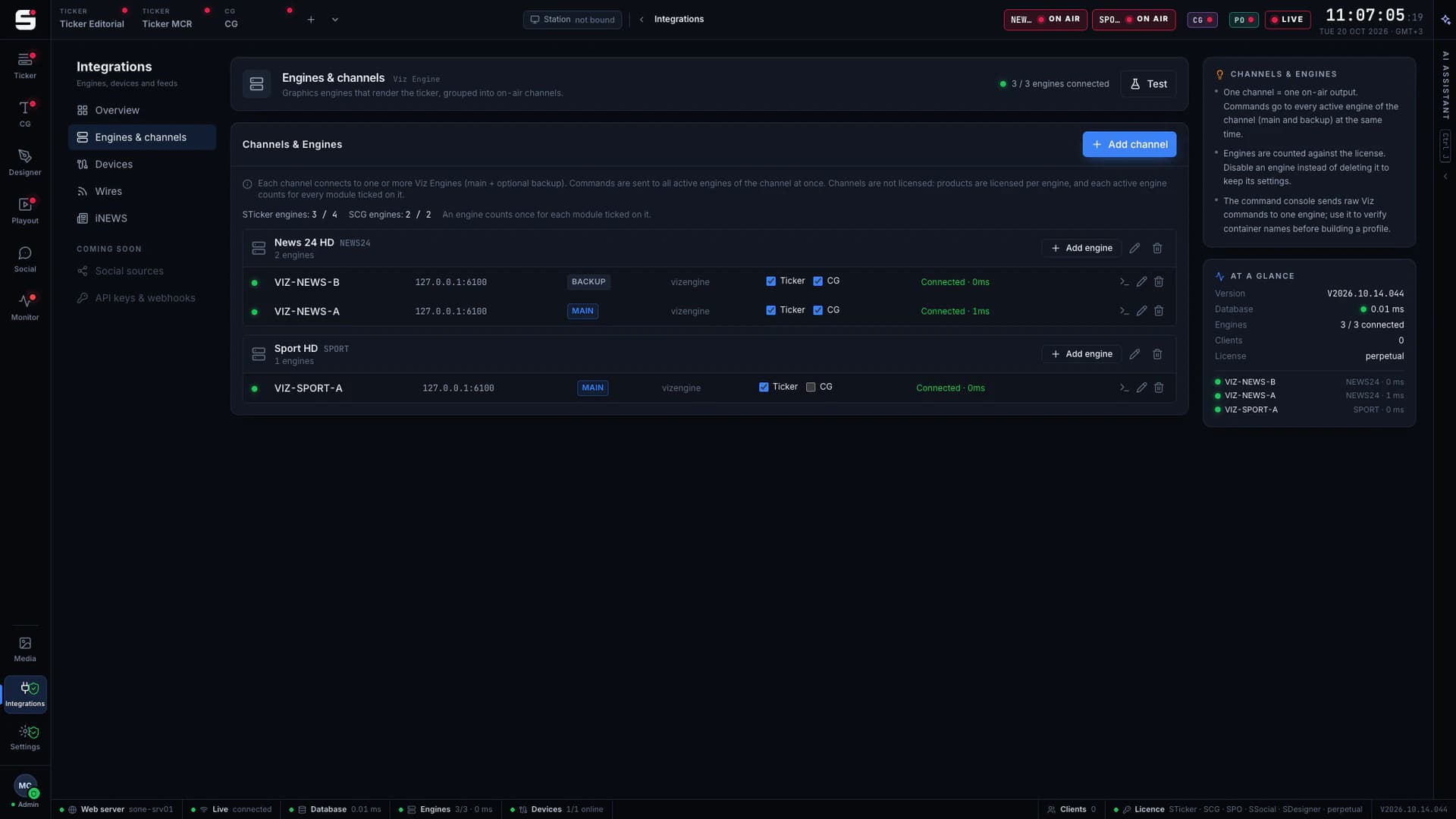
Channels, engines and devices in one place.
Each channel lists its main and backup engines and which products they serve. Devices, wires and newsroom sources sit next to them, each with a live connection state.
See it running on your own engines.
Book a walkthrough with people who have run master control. We will show SONE with your scenes, your playout format and your newsroom feeds.